

Ever been in the middle of a DIY project only to have your cordless drill battery give out on you? Frustrating, isn’t it? You’re not alone. Dead cordless drill batteries can put a halt to your plans and leave you feeling stuck. But what if there was a way to breathe new life into that seemingly lifeless battery?
Key Takeaways
- Understand common causes of cordless drill battery failure, such as overcharging, deep discharge, age, and environmental factors, to prevent issues and prolong battery life.
- Recognize signs of battery failure like reduced run time, charging issues, and physical damage to address problems promptly.
- Implement preventive measures like proper charging, storage, regular use, and maintenance to extend the lifespan of cordless drill batteries.
- When troubleshooting dead batteries, start with basic checks, consider revival methods like trickle charging or jump-starting, and opt for replacement if necessary.
- Assess dead cordless drill battery condition by checking for physical damage, testing voltage output, conducting discharge tests, observing heat generation, and analyzing charging behavior.
- Revive dead cordless drill batteries using reconditioning techniques, freezing method, or Epsom salt solution after understanding the steps and safety precautions involved.
Understanding Cordless Drill Battery Failure
When it comes to cordless drill batteries, understanding why they fail can help you troubleshoot issues more effectively. Here’s a breakdown:
Common Causes of Cordless Drill Battery Failure
Batteries can fail due to various reasons. Some common causes include:
- Overcharging: Leaving your battery connected to the charger for extended periods can lead to damage.
- Deep Discharge: Allowing the battery to completely discharge before recharging can harm its cells.
- Age: Over time, batteries naturally degrade, reducing their overall capacity.
- Environmental Factors: Exposure to extreme temperatures or moisture can impact battery performance.
Signs of Battery Failure
To identify battery failure, watch out for these signs:
- Reduced Run Time: If your battery doesn’t last as long as it used to, it may be failing.
- Charging Issues: Difficulty charging the battery or rapid draining can indicate a problem.
- Physical Damage: Swollen or leaking batteries are a clear sign of failure.
Preventing Battery Failure
To prolong the life of your cordless drill battery, consider these tips:
- Proper Charging: Avoid overcharging and deep discharging.
- Storage: Store batteries in a cool, dry place when not in use.
- Regular Use: Utilize your batteries regularly to maintain their health.
- Maintenance: Clean battery contacts and inspect for damage periodically.
Troubleshooting Dead Batteries
If you encounter a dead cordless drill battery, here are steps to try:
- Initial Check: Ensure the charger is working correctly and the battery contacts are clean.
- Reviving Methods: Attempt techniques like trickle charging or jump-starting the battery.
- Replacement: If all else fails, consider replacing the battery with a new one.
Understanding the reasons behind cordless drill battery failure empowers you to take proactive steps in maintaining and reviving your batteries for optimal performance.
Common Causes of Cordless Drill Battery Failure
When it comes to the frustration of dealing with a dead cordless drill battery, understanding the common causes of battery failure can help you prevent future issues and prolong the life of your batteries. Here are the primary reasons why cordless drill batteries fail:
- Overcharging: Leaving your cordless drill battery on the charger for too long can lead to overcharging. This can cause damage to the battery cells and reduce the overall capacity of the battery.
- Deep Discharge: Allowing your battery to fully discharge before recharging it can lead to deep discharge, which can be harmful to the battery’s health and longevity.
- Age: Like many electronic devices, cordless drill batteries have a limited lifespan. As batteries age, their capacity decreases, and they may fail to hold a charge effectively.
- Environmental Factors: Exposure to extreme temperatures or humidity can impact the performance and lifespan of your cordless drill battery.
Being aware of these common causes of cordless drill battery failure can help you take proactive steps to maintain your batteries properly and avoid premature failure.
Recommended Products

[21V 20V Battery Charger Compatible Models] The Gonine DC 21V Lithium Battery Charger compatible with dc 20V 21V 21Volt Mini Chainsaw, Portable Electric Chainsaw Cordless, Small Handheld Chainsaw Pruning Shears Chainsaw, 6 Inch 2023 Upgrade Small Handheld Chain saw. Fit for Saker, for Jujubean, for SEYVUM, for DINSHARE, for VTEK Mini Chainsaw Cordless; Also Perfectly compatible with 20V/21V power tools including for Seyvum Leaf Blower, for Ohey Electric Brush Cutter, mini chainsaws, hand drills, electric wrenches, and screwdrivers. Universal design eliminates the need for multiple chargers.
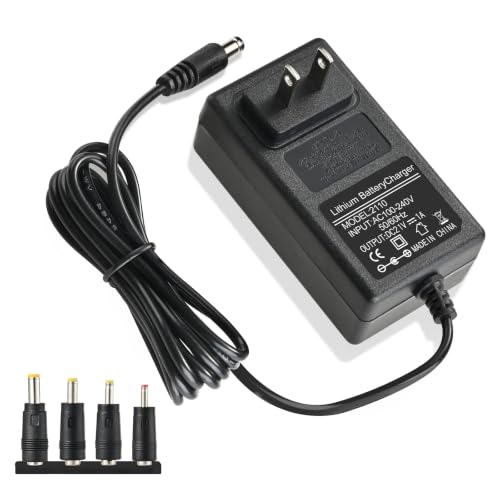
【21V Charger Specification & Compatibility】: Worldwide input voltage range: 100-240V 50/60HZ; Output: 21V DC. Power cord length: 3.9FT/1.2M. Charging Port: Round Jack. DC Port Size: 5.5 x 2.5mm (also fits 5.5 x 2.1mm). Designed for use with most 20V and 21V lithium battery packs found on common cordless power tools.
Assessing the Condition of a Dead Cordless Drill Battery
When it comes to figuring out why your cordless drill battery isn’t performing as expected, you can follow these simple steps to assess its condition accurately:
Recommended Products

【High Capacity & Extended Runtime】Upgrade your tools with 18V 5.0Ah Ni-MH batteries. Each pack delivers steady power and longer run time, helping you finish projects faster without frequent recharging. Perfect for home renovation, woodworking, or construction sites.

HIGH CAPACITY AND LONG LIFE-Adopting advanced lithium-ion battery technology, with a capacity of up to 1500mAh, it provides up to several hours of continuous operation to meet the needs of your long-term operation.

【Enhanced 2-Pack 4Ah High-Capacity】 Power up your tools with this upgraded 4Ah (4,000mAh) replacement for DeWalt 20V Max batteries. Delivers consistent, high performance and extended runtime. This 2-pack ensures your workflow remains uninterrupted, keeping you ready for any task.
Checking for Physical Damage
Start by visually inspecting the battery for any signs of physical damage, such as cracks, leaks, or bulges. These issues can indicate serious internal problems that may render the battery unusable. If you notice any physical damage, it’s best to stop using the battery immediately and consider replacing it.
Testing the Voltage Output
Using a multimeter, measure the voltage output of the battery. A fully charged cordless drill battery typically reads around 20 volts or the voltage specified by the manufacturer. If the voltage reading is significantly lower or the battery fails to hold a charge, it may be time to consider revitalizing or replacing it.
Conducting a Discharge Test
Perform a discharge test by using the battery in your cordless drill until it completely drains. Then, recharge it fully and check how long it can power the drill under normal usage conditions. If the battery discharges quickly or struggles to hold a charge, it could be a sign of a degraded battery that needs attention.
Observing Heat Generation
During use, pay attention to how hot the battery becomes. Excessive heat production, accompanied by a rapid voltage drop, can indicate internal damage or wear, leading to decreased battery efficiency. If you feel the battery is getting unusually hot during operation, it’s advisable to investigate further.
Analyzing Charging Behavior
Observe how the battery behaves during the charging process. If it takes an unusually long time to charge, doesn’t reach a full charge, or becomes hot while charging, these are signs that the battery may be reaching the end of its lifespan and requires evaluation.
By following these steps to assess the condition of your dead cordless drill battery, you can gain valuable insights into its health and make informed decisions on whether to revive, repair, or replace it for optimal performance during your DIY projects.
Methods to Revive a Dead Cordless Drill Battery
To bring a dead cordless drill battery back to life, you have a few methods at your disposal. Each method has its own steps and considerations, helping you determine the best course of action for your specific situation.
Recommended Products

Compatible with 12V MAX* and BLACK+DECKER 20V MAX* lithium ion battery/ slide pack batteries
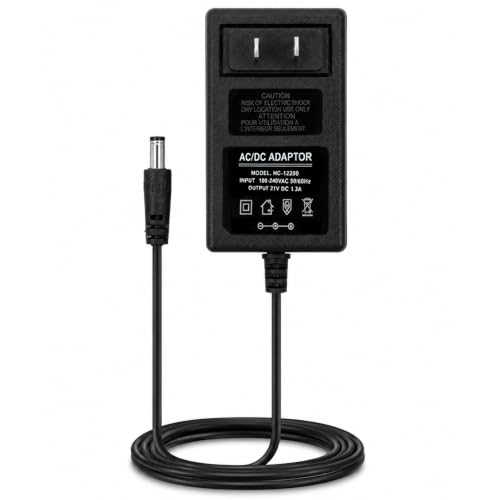
【Universal Fast Charger for All COMOWARE 20V Batteries】 This official genuine adapter is designed to work with all COMOWARE 20V cordless drill batteries. Enjoy quick charging that powers up your batteries faster than standard chargers—ideal for continuous work on job sites or DIY projects.

[Replacement for 20V 12V Battery Charger] High quality 20v lithium Ion battery charger can replace for original 20V 12V Charger. We have done product compatibility testing on the 20V 12V Lithium Ion Batteries
Reconditioning Technique
To start, consider using a reconditioning technique to revive your dead cordless drill battery. It involves a series of steps aimed at restoring the battery’s capacity and performance.
- Discharge the Battery: Begin by fully discharging the battery by using it in a safe and controlled manner until it’s completely drained.
- Charge the Battery: Next, charge the battery fully using the appropriate charging equipment and following the manufacturer’s guidelines.
- Repeat the Process: You may need to repeat the process of discharging and recharging a few times to help break down any crystalline structures inside the battery that could be causing the issue.
Freezing Method
Another method to consider is the freezing technique, which can sometimes help revive dead cordless drill batteries.
- Place in Freezer: Wrap your dead battery in a plastic bag and place it in the freezer for about 24 hours.
- Thaw and Recharge: After freezing, let the battery thaw to room temperature. Then, recharge it using a suitable charger.
- Test the Battery: Once recharged, test the battery in your cordless drill to see if there’s any improvement in performance.
Epsom Salt Solution
Using an Epsom salt solution is another approach that some DIY enthusiasts swear by for reviving dead batteries.
- Prepare the Solution: Create a solution by mixing distilled water with Epsom salt in a specific ratio.
- Inject the Solution: Carefully inject the solution into the battery cells using a syringe.
- Charge and Test: Charge the battery as usual and test its performance to see if there’s any noticeable enhancement.
By exploring these methods to revive your dead cordless drill battery, you can potentially extend its lifespan and save money on replacement costs. Remember to follow safety precautions and manufacturer recommendations when working with batteries for optimal results.
Safety Precautions When Dealing with Dead Batteries
When reviving a dead cordless drill battery, it’s crucial to prioritize safety to avoid accidents and damage to yourself and the battery. Here are key safety precautions to keep in mind during the process:
Inspect for Damage – Before starting any revival process, check the battery for physical damage, such as leaks, cracks, or deformities. Damaged batteries can be hazardous, so handle them carefully and dispose of them properly.
Work in a Well-Ventilated Area – Ensure you’re working in a location with good airflow to prevent the buildup of gases or fumes that dead batteries can emit. Proper ventilation reduces health risks and ensures your safety.
Wear Protective Gear – To shield yourself from exposure to harmful chemicals or battery components, always wear appropriate personal protective equipment, including gloves and safety goggles.
Avoid Water Exposure – Keep the battery and its components away from water or moisture as it can lead to short circuits or even electrocution. Make sure your hands are dry before handling the battery.
Follow Manufacturer Guidelines – Adhere to the manufacturer’s recommendations and safety guidelines specific to your cordless drill battery model. These guidelines may include optimal charging conditions and precautions for battery revival.
Proper Disposal – If the battery is beyond revival or repair, dispose of it according to local regulations for hazardous waste. Do not toss dead batteries in regular trash as they can be harmful to the environment.
Store Safely – When not in use, store dead batteries in a cool, dry place away from direct sunlight or extreme temperatures. Storing them properly reduces the risk of accidents and extends their lifespan.
Remember, prioritizing safety ensures a smooth and risk-free process when dealing with dead cordless drill batteries. By following these precautions, you can effectively revive or dispose of batteries while keeping yourself and the environment safe.
Conclusion
Reviving a dead cordless drill battery is a cost-effective way to enhance your DIY projects. By following simple steps to assess the battery’s condition and exploring various revival methods like reconditioning and using Epsom salt, you can potentially extend its lifespan. Remember, safety is key when dealing with dead batteries, so always prioritize following safety precautions to ensure a smooth and risk-free process. By taking care of your cordless drill battery and knowing how to revive it when needed, you can save on replacement costs and enjoy optimal performance during your DIY endeavors.
Frequently Asked Questions
What are the common causes of cordless drill battery failure?
Cordless drill battery failure can result from overcharging, deep discharging, physical damage, extreme temperatures, and old age.
How can I assess the condition of a dead cordless drill battery?
You can check for physical damage, test voltage output, conduct a discharge test, observe heat generation, and analyze charging behavior.
What are some methods to revive a dead cordless drill battery?
You can try reconditioning techniques such as discharging and recharging, the freezing method, or using an Epsom salt solution.
Why is following safety precautions important when dealing with dead cordless drill batteries?
Prioritizing safety ensures a smooth and risk-free process, preventing accidents and promoting personal safety and environmental protection.
